.png)



.png)



Territory Shape Editor
Build and edit territories visually with intuitive tools and map-based insights to manage changes.
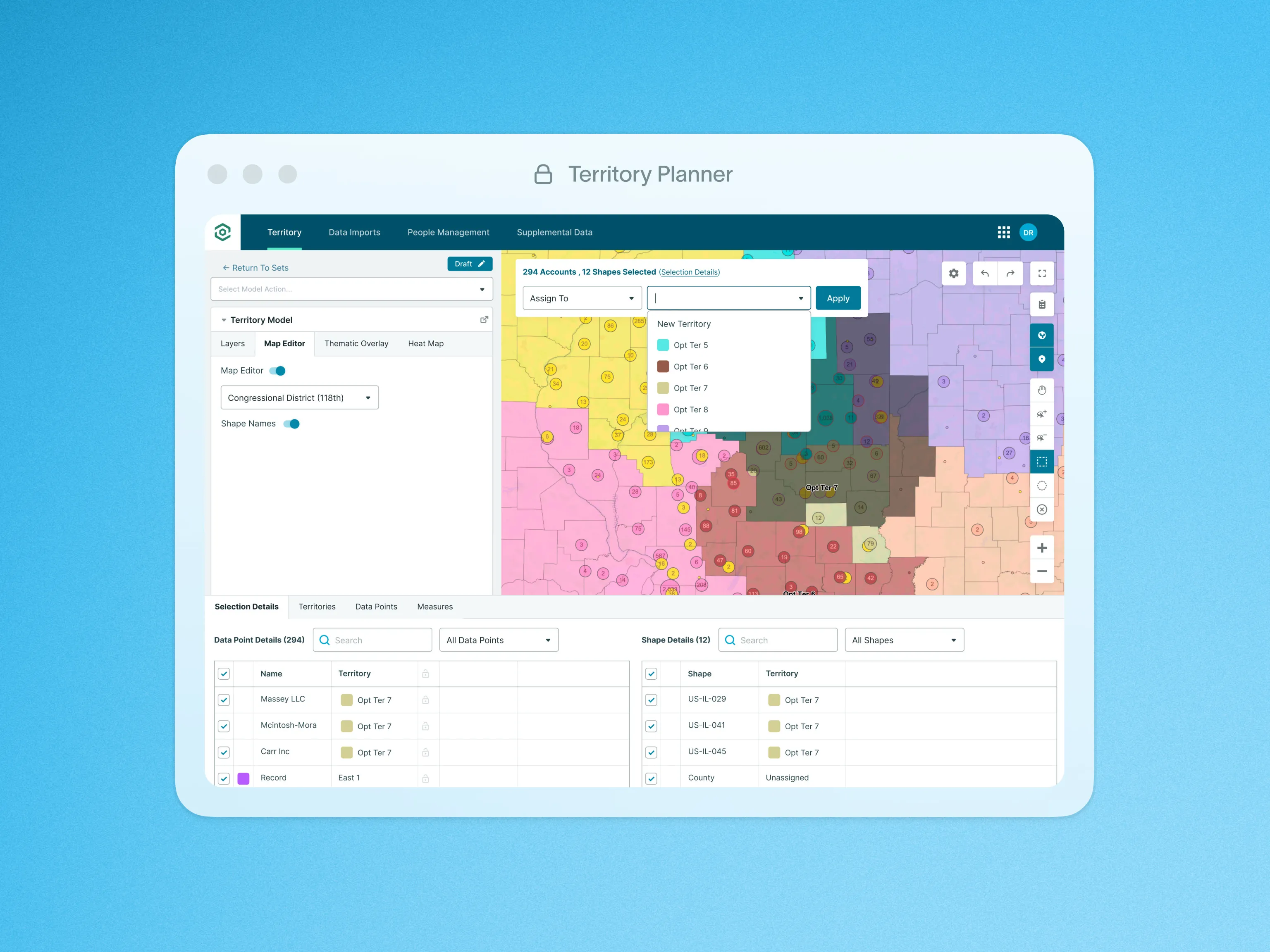
The Territory Shape Editor allows leaders to efficiently construct their team’s territories directly on the map using intuitive Shape selection tools and the Geographic Shape Library (Link to Shape Library Feature). Shapes can be quickly added to the map and selected by dragging or clicking with the lasso tool on the right side of the map, saving valuable time.
To simplify Shape-building, the map includes essential tools such as undo/redo buttons, a panning tool, and various Shape selection options, enhancing ease-of-use, and minimizing time spent on corrections.
The Control Panel’s Map Actions enable users to quickly assign outlined Shapes to a territory. Selected Shapes can be easily color-coded and named according to your preferences. Additionally, admins can automatically assign Data Points to the corresponding territory, streamlining the process and reducing manual work. This flexibility ensures that creating and managing territories is both time-efficient and user-friendly.
To learn more about Layers and Territories, visit our help site.